ВерниПароль.ру использует кукис-файлы. Продолжая пользоваться сайтом, вы соглашаетесь с их использованием.
Так точно!

A20s Firehose Loader Better -

Пожалуй, самый быстрый способ восстановить забытый пароль к файлам Microsoft Office и OpenOffice

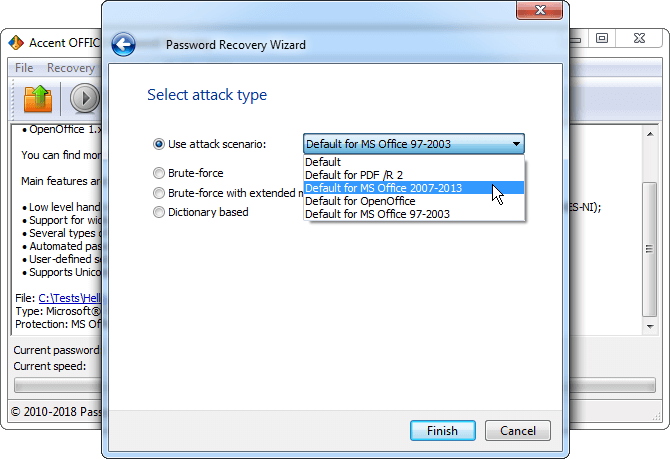
Снимок экрана Accent OFFICE Password Recovery

A20s Firehose Loader Better -

Before we discuss "better," we need to understand the mechanic. The Firehose loader (also known as the Sahara / Firehose protocol) is a piece of code signed by Qualcomm that acts as a bridge between your PC and the device's internal storage (eMMC) when the device is in Emergency Download (EDL) mode.

To properly use your improved firehose file, you must force the device to accept it via a low-level hardware interface. Step 1: Force EDL Mode (9008)

These professional tools often come with updated internal loaders that support newer security patches, such as Android 11 or 12. 3. How to Boot into EDL Mode a20s firehose loader better

三星设备通常不允许通过常规手段降级系统版本。但 Firehose Loader 可以无视这些限制,直接将旧版本的分区镜像写入存储芯片(不过这也带来了安全风险——详见第六部分)。

Finding the right firehose loader for the is critical for performing low-level operations like FRP bypass, MDM removal, or unbricking via Emergency Download (EDL) mode . Unlike standard Samsung devices that use Odin, the A20s uses a Qualcomm Snapdragon 450 chipset, which requires a specific programmer file ( .elf or .mbn ) to communicate with the phone's internal memory. Why You Need a "Better" Loader Before we discuss "better," we need to understand

Once executed, the loader initializes the storage bus (eMMC) and opens a high-speed data pipeline—hence the name "Firehose"—allowing the computer to completely rewrite the partitions, bypass secure boot locks, and flash the stock firmware.

If you’ve ever tried to unbrick, repair, or restore a Samsung Galaxy A20s (SM-A207F/DS/M), you’ve likely encountered the term . In the world of Qualcomm-based devices, this small programmer file is the key that unlocks the CPU’s most restricted debugging modes. But here’s the truth: not all Firehose loaders are created equal. For the A20s, using a better Firehose loader can mean the difference between a successful revival and a permanent paperweight. Step 1: Force EDL Mode (9008) These professional

Investing the time to track down a verified, community-tested A20s Firehose loader bypasses hours of trial error, preventing common software interface drops and successfully breathing life back into dead hardware.

The Samsung Galaxy A20s (SM-A207F, SM-A207M, and other variants) is a Qualcomm Snapdragon-based device that has become increasingly popular in the repair and modification community. At the heart of low-level device operations—unbricking, FRP reset, firmware restoration, and partition management—lies a small but critical file: the Firehose loader (also known as the programmer file). If you’ve been struggling with dead boot repairs, EDL connection issues, or incompatible loaders, this guide will help you understand how to find, use, and optimize the Firehose loader for your A20s to achieve better results.

A "better" or more reliable firehose loader provides several critical capabilities:

: Use an EDL tool to read the device info. The A20s typically has a HW_ID like 0009A0E100200000 .

Before we discuss "better," we need to understand the mechanic. The Firehose loader (also known as the Sahara / Firehose protocol) is a piece of code signed by Qualcomm that acts as a bridge between your PC and the device's internal storage (eMMC) when the device is in Emergency Download (EDL) mode.

To properly use your improved firehose file, you must force the device to accept it via a low-level hardware interface. Step 1: Force EDL Mode (9008)

These professional tools often come with updated internal loaders that support newer security patches, such as Android 11 or 12. 3. How to Boot into EDL Mode

三星设备通常不允许通过常规手段降级系统版本。但 Firehose Loader 可以无视这些限制,直接将旧版本的分区镜像写入存储芯片(不过这也带来了安全风险——详见第六部分)。

Finding the right firehose loader for the is critical for performing low-level operations like FRP bypass, MDM removal, or unbricking via Emergency Download (EDL) mode . Unlike standard Samsung devices that use Odin, the A20s uses a Qualcomm Snapdragon 450 chipset, which requires a specific programmer file ( .elf or .mbn ) to communicate with the phone's internal memory. Why You Need a "Better" Loader

Once executed, the loader initializes the storage bus (eMMC) and opens a high-speed data pipeline—hence the name "Firehose"—allowing the computer to completely rewrite the partitions, bypass secure boot locks, and flash the stock firmware.

If you’ve ever tried to unbrick, repair, or restore a Samsung Galaxy A20s (SM-A207F/DS/M), you’ve likely encountered the term . In the world of Qualcomm-based devices, this small programmer file is the key that unlocks the CPU’s most restricted debugging modes. But here’s the truth: not all Firehose loaders are created equal. For the A20s, using a better Firehose loader can mean the difference between a successful revival and a permanent paperweight.

Investing the time to track down a verified, community-tested A20s Firehose loader bypasses hours of trial error, preventing common software interface drops and successfully breathing life back into dead hardware.

The Samsung Galaxy A20s (SM-A207F, SM-A207M, and other variants) is a Qualcomm Snapdragon-based device that has become increasingly popular in the repair and modification community. At the heart of low-level device operations—unbricking, FRP reset, firmware restoration, and partition management—lies a small but critical file: the Firehose loader (also known as the programmer file). If you’ve been struggling with dead boot repairs, EDL connection issues, or incompatible loaders, this guide will help you understand how to find, use, and optimize the Firehose loader for your A20s to achieve better results.

A "better" or more reliable firehose loader provides several critical capabilities:

: Use an EDL tool to read the device info. The A20s typically has a HW_ID like 0009A0E100200000 .